CONTENTS04 +
Patch Nova.js so tools can register Vuex modules before lift-off, and get a real this.$store in every tool component.
UPDATE: After 1.1.8 this solution has some issues which make it conflict with the implementation of the Index view’s filters. This solution wasn’t even recommended to apply in the beginning…
UPDATE 2: There’s a follow-up article which doesn’t involve editing Nova’s source files: Laravel Nova & Vuex… a future proof solution?!
If you found this article, you’ve probably been asking the same questions as I have, and maybe even found my previous article about this topic. Having Vuex on the global Nova object isn’t necessarily the best or most convenient thing to have, so if you’re interested in a deeper, more flexible integration and you’re not afraid of touching the Nova base, then here’s how I did it.
Patching Nova
- Go into your
novafolder and runnpm installto install all the front-end dependencies. If Vuex isn’t among them, add it withnpm install vuex --save. - Edit the
Nova.jsfile in yournova/resources/jsfolder. Here’s my example for it:
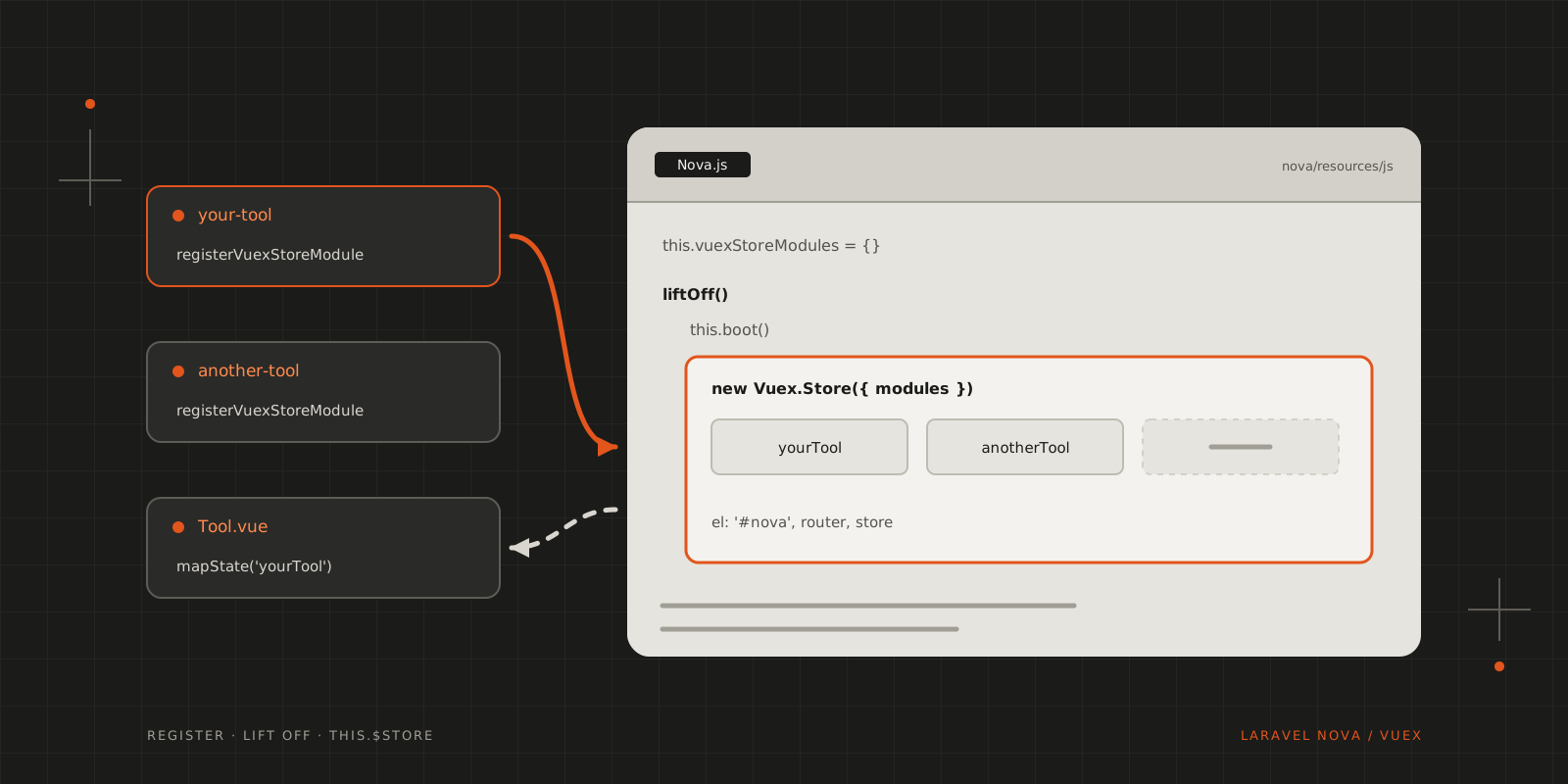
1import Loading from '@/components/Loading'2import router from '@/router'3import axios from '@/util/axios'4import PortalVue from 'portal-vue'5import Vue from 'vue'6import AsyncComputed from 'vue-async-computed'7import Toasted from 'vue-toasted'8import Vuex from 'vuex'910Vue.use(PortalVue)11Vue.use(AsyncComputed)12Vue.use(Vuex)1314Vue.use(Toasted, {15 router,16 theme: 'nova',17 position: 'bottom-right',18 duration: 6000,19})2021export default class Nova {22 constructor(config) {23 this.bus = new Vue()24 this.bootingCallbacks = []25 this.vuexStoreModules = {}26 this.config = config27 }2829 /**30 * Register a callback to be called before Nova starts. This is used to bootstrap31 * addons, tools, custom fields, or anything else Nova needs32 */33 booting(callback) {34 this.bootingCallbacks.push(callback)35 }3637 /**38 * Execute all of the booting callbacks.39 */40 boot() {41 this.bootingCallbacks.forEach(callback => callback(Vue, router))4243 this.bootingCallbacks = []44 }4546 /**47 * Register a Vuex module to be included in the root Vue instance's store48 * @param {String} moduleName49 * @param {Object} module50 */51 registerVuexStoreModule(moduleName, module) {52 this.vuexStoreModules[moduleName] = module53 }5455 /**56 * Start the Nova app by calling each of the tool's callbacks and then creating57 * the underlying Vue instance.58 */59 liftOff() {60 let _this = this6162 this.boot()6364 this.app = new Vue({65 el: '#nova',66 router,67 components: {68 Loading69 },70 store: new Vuex.Store({71 modules: _this.vuexStoreModules72 }),73 mounted: function () {74 this.$loading = this.$refs.loading7576 _this.$on('error', message => {77 this.$toasted.show(message, {78 type: 'error'79 })80 })81 },82 })83 }8485 /**86 * Return an axios instance configured to make requests to Nova's API87 * and handle certain response codes.88 */89 request(options) {90 if (options !== undefined) {91 return axios(options)92 }9394 return axios95 }9697 /**98 * Register a listener on Nova's built-in event bus99 */100 $on(...args) {101 this.bus.$on(...args)102 }103104 /**105 * Register a one-time listener on the event bus106 */107 $once(...args) {108 this.bus.$once(...args)109 }110111 /**112 * Unregister a listener on the event bus113 */114 $off(...args) {115 this.bus.$off(...args)116 }117118 /**119 * Emit an event on the event bus120 */121 $emit(...args) {122 this.bus.$emit(...args)123 }124}The changes compared to the original are small: Vuex is installed on Nova’s own Vue, there’s a vuexStoreModules collection with a registerVuexStoreModule() method to fill it, and liftOff() hands a store built from those modules to the root instance.
This works because liftOff() calls boot() first, so every tool’s booting callback has run, and registered its module, before the store is created.
- Build and publish the updated Nova assets, so the application serves your version instead of the original:
cd novanpm run productioncd ..php artisan vendor:publish --tag=nova-assets --force- Register your Vuex stores from your tools / resource tools and have some fun with it :) Below is an example to do just that.
Registering a store from your tool
The store parts are the same files as in the previous article. The difference is that they’re registered as a module instead of becoming a store of their own:
1import state from './store/state'2import actions from './store/actions'3import getters from './store/getters'4import mutations from './store/mutations'56Nova.booting((Vue, router) => {7 Vue.component('your-tool', require('./components/Tool'))89 Nova.registerVuexStoreModule('yourTool', {10 namespaced: true,11 state,12 actions,13 getters,14 mutations15 })16})Make the module namespaced. Every tool now shares one store, and without a namespace two tools with a setItems mutation or a loading getter would step on each other’s toes.
Using it in components
Since the store is on the root instance now, this.$store works in every component, and so do Vuex’s map helpers:
1<template>2 <div>3 <heading class="mb-6">Your Tool</heading>45 <card class="p-6">6 <p v-if="loading">Loading…</p>7 <p v-else>{{ itemCount }} items</p>8 </card>9 </div>10</template>1112<script>13import { mapActions, mapGetters, mapState } from 'vuex'1415export default {16 computed: {17 ...mapState('yourTool', ['loading']),18 ...mapGetters('yourTool', ['itemCount'])19 },2021 methods: {22 ...mapActions('yourTool', ['fetchItems'])23 },2425 mounted () {26 this.fetchItems()27 }28}29</script>No more reaching for a store on the global Nova object, and the Vue devtools show every tool’s module in one place.
Wrapping up
Use this knowledge wisely, because Vuex support for Nova is coming (I hope), and if you start overwriting source files, you’ll have a tough time updating the Nova base.
CITE THIS POST
Referencing this in a paper or thesis? Here’s a BibTeX entry.
1@misc{galicz2018laravel,2 author = {Galicz, Mikl{\'o}s},3 title = {{Laravel Nova \& Vuex, the Second Round}},4 year = {2018},5 month = nov,6 howpublished = {\url{https://blackfyre.ninja/blog/laravel-nova-and-vuex-the-second-round/}},7 url = {https://blackfyre.ninja/blog/laravel-nova-and-vuex-the-second-round/},8 urldate = {2026-10-28},9 note = {Blog post, blackfyre.ninja}10}