CONTENTS05 +
A ready-made .devcontainer for Laravel: Nginx, PHP 7.4, MySQL, Redis and Mailhog in Docker, with VS Code working inside the container.
Visual Studio Code has been becoming one of the most versatile tools out there, for just about any kind of software development. Be it DIY code hacking for Arduinos or professional-level development with the aid of powerful extensions.
One of these extensions is the Remote - Containers extension from Microsoft, which enables the developer to log into a Docker container and use it as a full-featured development environment.
This feature can be further augmented with the use of a .devcontainer/devcontainer.json file, which enables the developer to manage these containers in a more integrated fashion and add, for example, environment-specific VS Code extensions.
All of this results in a relatively clean, clutter-free host system with a really portable development environment. To this end, I’ve taken the knowledge gathered and created a GitHub project to help those interested to get started with this new realm of possibilities!
What’s in the box
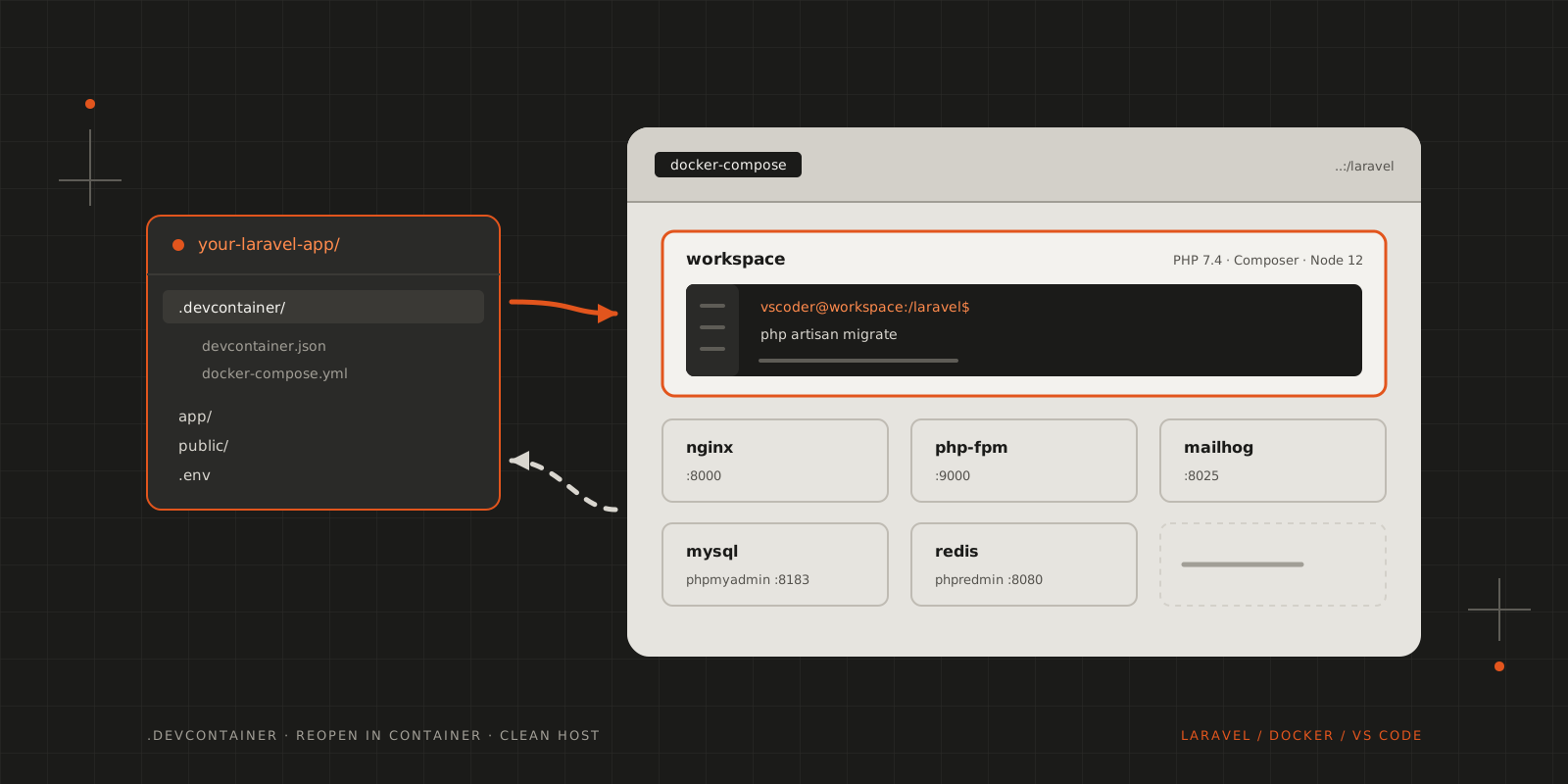
LDVSC is a Docker Compose setup for Laravel development, one service per job:
| Service | What it does | On the host |
|---|---|---|
| workspace | PHP 7.4 CLI, Composer, Node 12 and Yarn; VS Code runs here | — |
| php-fpm | Runs the application for Nginx | — |
| nginx | Serves public/ | 8000 |
| mysql | Latest MySQL | — |
| phpmyadmin | MySQL in the browser | 8183 |
| redis | Cache, queues and sessions | — |
| phpredmin | Redis in the browser | 8080 |
| mailhog | Catches every e-mail the app sends | 8025 |
Your project is mounted at /laravel in the workspace, php-fpm and nginx containers, so a file you save in VS Code is the file Nginx serves.
Getting started
You’ll need Docker and VS Code with the ms-vscode-remote.remote-containers extension. Then clone the repo into your Laravel project, into a folder called .devcontainer:
git clone [email protected]:blackfyre/ldvsc.git .devcontainerThe folder name is the important bit: that’s what VS Code looks for. Open the project, and VS Code offers to reopen it in the container. The first start builds the images, so give it a few minutes; after that it’s quick.
How it fits together
devcontainer.json tells VS Code which Compose service to attach to, which user to be and what to install inside the container:
1{2 "name": "Laravel",3 "service": "workspace",4 "remoteUser": "vscoder",5 "shutdownAction": "stopCompose",6 "workspaceFolder": "/laravel",7 "dockerComposeFile": "docker-compose.yml",89 "extensions": [10 "bmewburn.vscode-intelephense-client",11 "eamodio.gitlens",12 "EditorConfig.EditorConfig",13 "mikestead.dotenv",14 "ms-azuretools.vscode-docker",15 "onecentlin.laravel-blade",16 "redhat.vscode-yaml",17 "wongjn.php-sniffer"18 ]19}The extensions are installed in the container’s VS Code server, not on your machine, so a PHP project gets PHP tooling without it ending up in your everyday editor. shutdownAction stops the whole Compose stack when you close the window.
The workspace container runs as vscoder with the UID 1000, the same as the first user on most Linux desktops, so files created inside the container still belong to you on the host. Your ~/.ssh is mounted read-only, so git push works from the integrated terminal, and Composer’s cache lives in a named volume, so it survives rebuilds.
Pointing Laravel at the services
Inside the Compose network the services are reachable by name, so the .env only needs the service names and the credentials from docker-compose.yml:
1DB_CONNECTION=mysql2DB_HOST=mysql3DB_PORT=33064DB_DATABASE=default_schema5DB_USERNAME=user6DB_PASSWORD=user78REDIS_HOST=redis910MAIL_MAILER=smtp11MAIL_HOST=mailhog12MAIL_PORT=1025Run php artisan migrate from VS Code’s terminal, open http://localhost:8000, and anything the app mails lands in Mailhog at http://localhost:8025.
These credentials are for local development only. The setup isn’t hardened, so don’t reuse it for anything public.
Wrapping up
The repo is accessible at github.com/blackfyre/ldvsc, and it comes with instructions. Don’t worry, it’s not going to hurt…
CITE THIS POST
Referencing this in a paper or thesis? Here’s a BibTeX entry.
1@misc{galicz2020ldvsc,2 author = {Galicz, Mikl{\'o}s},3 title = {{LDVSC --- Laravel with Docker and VSCode}},4 year = {2020},5 month = aug,6 howpublished = {\url{https://blackfyre.ninja/blog/ldvsc-laravel-with-docker-and-vscode/}},7 url = {https://blackfyre.ninja/blog/ldvsc-laravel-with-docker-and-vscode/},8 urldate = {2026-10-28},9 note = {Blog post, blackfyre.ninja}10}