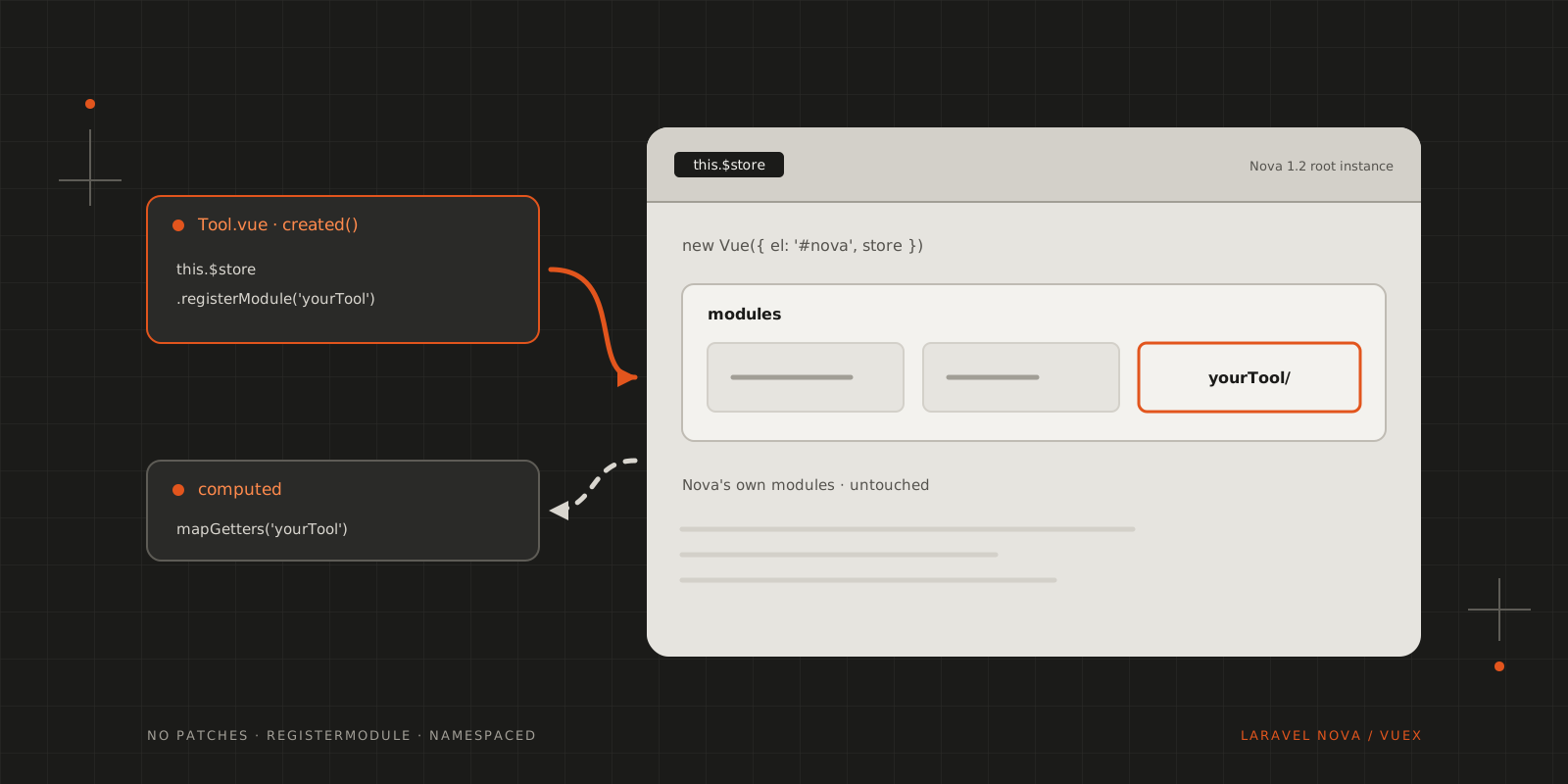
Since Nova 1.2 the root Vue instance has a Vuex store. Register your tool's module on it with registerModule, no patching required.
If you follow my stories, you probably know by now that I’ve got an ongoing fight to get Vuex properly working with my Laravel Nova admin site.
A quick recap
The first iteration was to attach a Vuex store to the Nova global object, which works… but not an ideal one…
The second trial was to modify the source files of Nova to access the root creation and append my Vuex store there. (This is a viable approach if you don’t install Nova through Composer.) This approach was quickly deprecated by version 1.1.9, which added Vuex, and since then some parts of Nova use it as well.
A solution?!
After Nova 1.2 we have a modular Vuex store available on the root instance (where its proper place is), and it’s accessible through the this.$store object! This enables us to do lots of “evil & nasty” things 😈
- You’ll need to install Vuex for your tool / resource tool.
- In your tool’s
resources/js/components/Tool.vuefile, in thecreated()lifecycle hook, you can dynamically register your store object withthis.$store.registerModule(). - To use the store, you can access the state through the
this.$storeobject, or (my favourite) the map helpers:mapGetters,mapActions, …
Step by step
Installing Vuex in the tool is only needed for the map helpers. The store itself is Nova’s, so the tool never creates one:
npm install vuex --saveThe module is the same set of files as in the previous articles, bundled up and namespaced:
1import state from './state'2import actions from './actions'3import getters from './getters'4import mutations from './mutations'56export default {7 namespaced: true,8 state,9 actions,10 getters,11 mutations12}Then the tool registers it when its component is created:
1<template>2 <div>3 <heading class="mb-6">Your Tool</heading>45 <card class="p-6">6 <p v-if="loading">Loading…</p>7 <p v-else>{{ itemCount }} items</p>8 </card>9 </div>10</template>1112<script>13import { mapActions, mapGetters, mapState } from 'vuex'14import store from '../store'1516export default {17 created () {18 // The component is created again on every visit, but the store lives on.19 if (!this.$store.state.yourTool) {20 this.$store.registerModule('yourTool', store)21 }22 },2324 computed: {25 ...mapState('yourTool', ['loading']),26 ...mapGetters('yourTool', ['itemCount'])27 },2829 methods: {30 ...mapActions('yourTool', ['fetchItems'])31 },3233 mounted () {34 this.fetchItems()35 }36}37</script>Nova keeps the same root instance, and with it the same store, while you navigate, but your tool’s component is created again each time you open the tool. Registering the module again would replace it and throw away its state, which is why created() registers it only when its state isn’t there yet.
Since the module stays registered, the tool’s state also survives leaving the tool and coming back, which is usually what you want for filters or a half-filled form.
Why it’s future proof
This is a future proof method because the team probably won’t remove Vuex support in the future, and this is a supported, although little known, way of adding modules to the Vuex store.
It’s recommended that you namespace your modules to avoid collisions with other libraries!
CITE THIS POST
Referencing this in a paper or thesis? Here’s a BibTeX entry.
1@misc{galicz2018laravelfuture,2 author = {Galicz, Mikl{\'o}s},3 title = {{Laravel Nova \& Vuex… a future proof solution?!}},4 year = {2018},5 month = dec,6 howpublished = {\url{https://blackfyre.ninja/blog/laravel-nova-and-vuex-a-future-proof-solution/}},7 url = {https://blackfyre.ninja/blog/laravel-nova-and-vuex-a-future-proof-solution/},8 urldate = {2026-10-28},9 note = {Blog post, blackfyre.ninja}10}