CONTENTS06 +
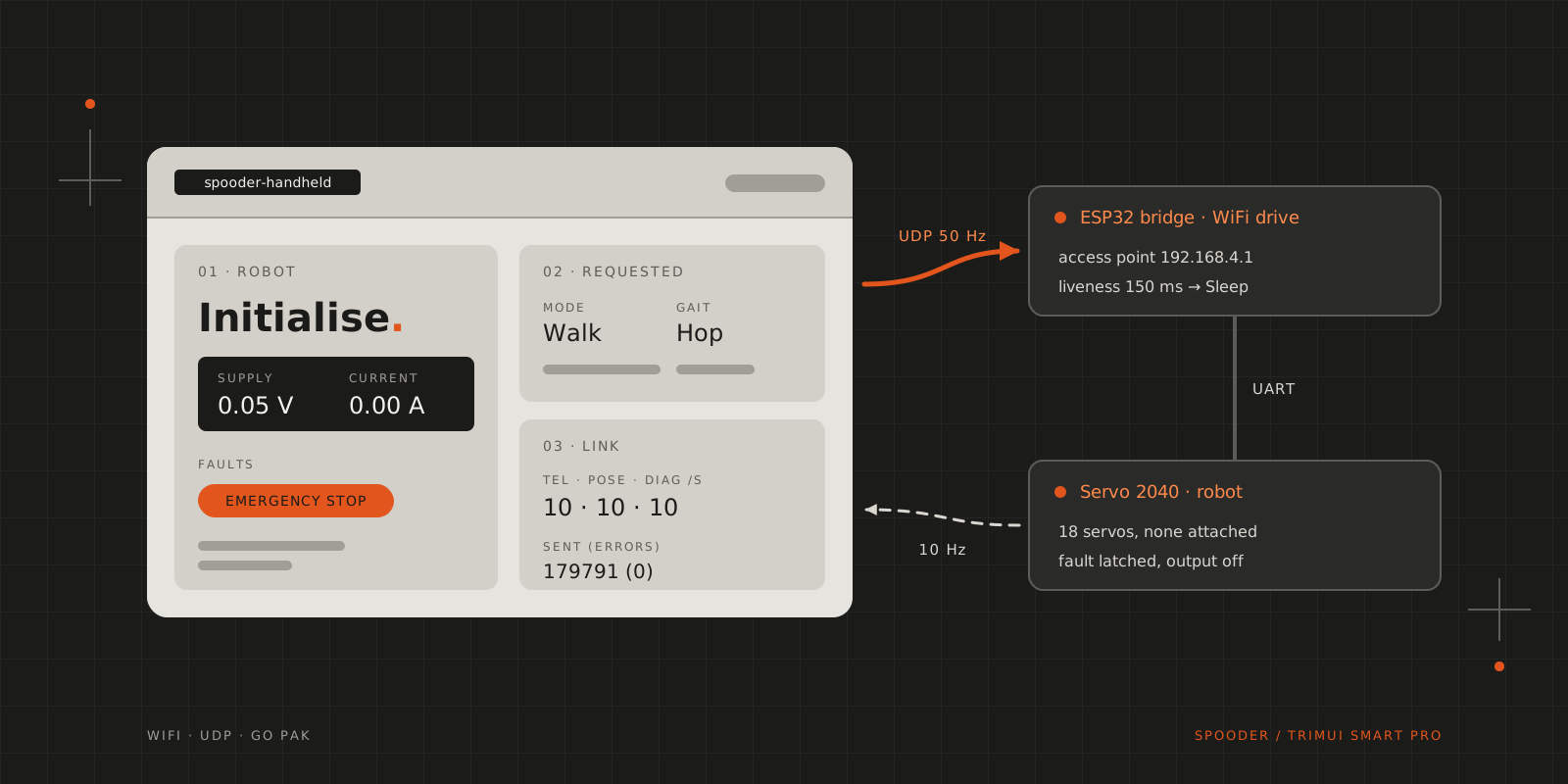
How a TrimUI Smart Pro came to drive Spooder over WiFi: the transport, measuring the link, a splash screen that wouldn't quit and a Go pak.
On 28 October I took my daughter to the office with me and packed my TrimUI Smart Pro in case she got bored. She did, and by the time we went home she had drained its battery completely. On 5 November, going through my backpack, I found it still waiting for a charge, and Spooder, my hexapod, was waiting too: five of its six legs were built, and the rest needed more M3×12 countersunk screws than I had in the house. I spent half the afternoon staring at the handheld before a what-if came. Spooder is driven by an 8BitDo gamepad through an ESP32 bridge with a 240×135 screen, and this handheld has two sticks and a 1280×720 screen. I wanted to know whether it could replace both.
The robot side was mostly ready for a second controller. Spooder’s legs run on a Pimoroni Servo 2040, and the bridge, a LilyGO T-Display, talks to it over a serial line in the same framed protocol the robot also accepts on its USB port. The bridge sends the complete desired state every 20 ms, and the robot treats a command older than a second as stale, so a controller that falls silent puts the robot to sleep rather than leaving it walking. The bridge even had a precedent for a controller that isn’t a gamepad: its setup mode swaps Bluetooth for a WiFi access point, and a phone polling the setup page counts as connected until it stops.
Choosing a transport
Three ways in were worth considering, and WiFi through the bridge was the only one that cut the cord without a fight with a Bluetooth stack.
| Option | Untethered | Firmware work | Main unknown |
|---|---|---|---|
| WiFi via the bridge | yes | a new bridge mode, modelled on setup mode | WiFi latency and dropouts |
| USB tether to the robot | no | none | whether NextUI’s kernel can be a USB serial host |
| Bluetooth LE to the bridge | yes | a custom GATT service inside Bluepad32’s BTstack | BlueZ on NextUI, customising BTstack |
A USB cable would suit a calibrator on the bench, but not a robot that walks away from you. Over WiFi the handheld replaces the gamepad, so the bridge doesn’t need Bluetooth at all in that mode, which keeps a rule it already follows: Bluetooth and WiFi never share the ESP32’s radio. The bridge runs an access point, relays the handheld’s UDP packets to the robot’s serial line and keeps its own 20 ms heartbeat to the robot. The bridge, not the handheld, decides whether a controller is connected, so a handheld that goes quiet always ends with the robot asleep.
Both of the bridge’s buttons were taken, one for setup mode and paging, the other for the emergency stop. A latching switch between GPIO32 and ground now chooses between Bluetooth and WiFi at boot. An open contact means Bluetooth, so a broken wire or an unfitted switch falls back to the mode that already works. Flipping the switch while the bridge runs only shows SWITCH MOVED: RESTART on its screen, because restarting by itself would drop the link mid-stride.
The handheld’s screen also had room for more than the bridge’s had shown. The robot used to send its pose (each joint’s commanded angle, servo angle and pulse) and its diagnostics (speed budget, loop time, averaged current) only over USB, and the bridge saw telemetry alone: mode, gait, faults, voltage and current. All three at 10 Hz come to 1,870 bytes a second, about 16% of what the 115,200-baud link carries, so the robot now sends them all the time. Both frame types already existed in the protocol, so the robot and the bridge don’t have to be flashed as a pair.
Reading NextUI’s source
NextUI makes room for third-party apps. A pak is a folder under Tools/tg5040/ with a launch.sh and whatever that script starts, and while it runs, it has the screen and every button to itself. The Smart Pro’s platform code in workspace/tg5040/ answered most of my questions before I touched the device. Graphics go through SDL2 with GLES and no window system. That rules out Gio, the UI toolkit of Spooder’s desktop calibrator, so the calibrator couldn’t simply be cross-compiled for the handheld. Both sticks are SDL joystick axes from about −30,000 to +30,000, and L2 and R2 are analogue too.
One detail suits a robot controller: NextUI’s own apps handle sleep themselves, so a standalone pak sees the power button as an ordinary button, and my app can tell the robot to sleep before the handheld does anything else. WiFi is plain wpa_supplicant and udhcpc on wlan0, joined through NextUI’s settings menu.
Measuring WiFi on the handheld
Before writing an app, I wanted to know whether the WiFi was steady enough to steer with. The handheld runs Tina Linux on kernel 4.9.191 with glibc 2.33, and its WiFi chip is Allwinner’s XR829 on the xradio_wlan driver, with power saving on by default.
It took three attempts to get a number. The first run lost every ping because the handheld was still on my home WiFi. The remote terminal I ran the test from used that same WiFi, so the test had to run on the handheld on its own. The second run joined the bridge’s network but kept its home address, 192.168.0.84, so pings to the bridge at 192.168.4.1 had nowhere to go. The real app checks that it is on the bridge’s network after joining and renews its address once with udhcpc if not. The third run measured the WiFi.
| Link | Power saving | Lost | Average | Worst |
|---|---|---|---|---|
| Home router | on | 3 of 30 | 12.2 ms | 107.6 ms |
| Home router | off | 3 of 30 | 3.9 ms | 18.4 ms |
| Bridge access point | off | 0 of 1,000 | 5.1 ms | 34.2 ms |
Turning power saving off cut the worst case on my home network by a factor of six, so the app turns it off while it runs and restores it on exit. The 10% loss belonged to the home network: talking straight to the ESP32, the handheld lost nothing. The app sends 50 commands a second, so the bridge’s 150 ms liveness timeout tolerates seven lost packets in a row. I measured at −34 dBm, at close range; range and walking are still to be tested.
A splash screen that outlived its app
The ping test became a tiny pak, started from NextUI’s Tools menu. The first version ran silently for 25 seconds, which felt like being left in the dark, so the second used show2.elf, the splash tool NextUI ships in .system. In daemon mode it reads text and progress lines from /tmp/show2.fifo, so the pak could show each step, a progress bar and the result.
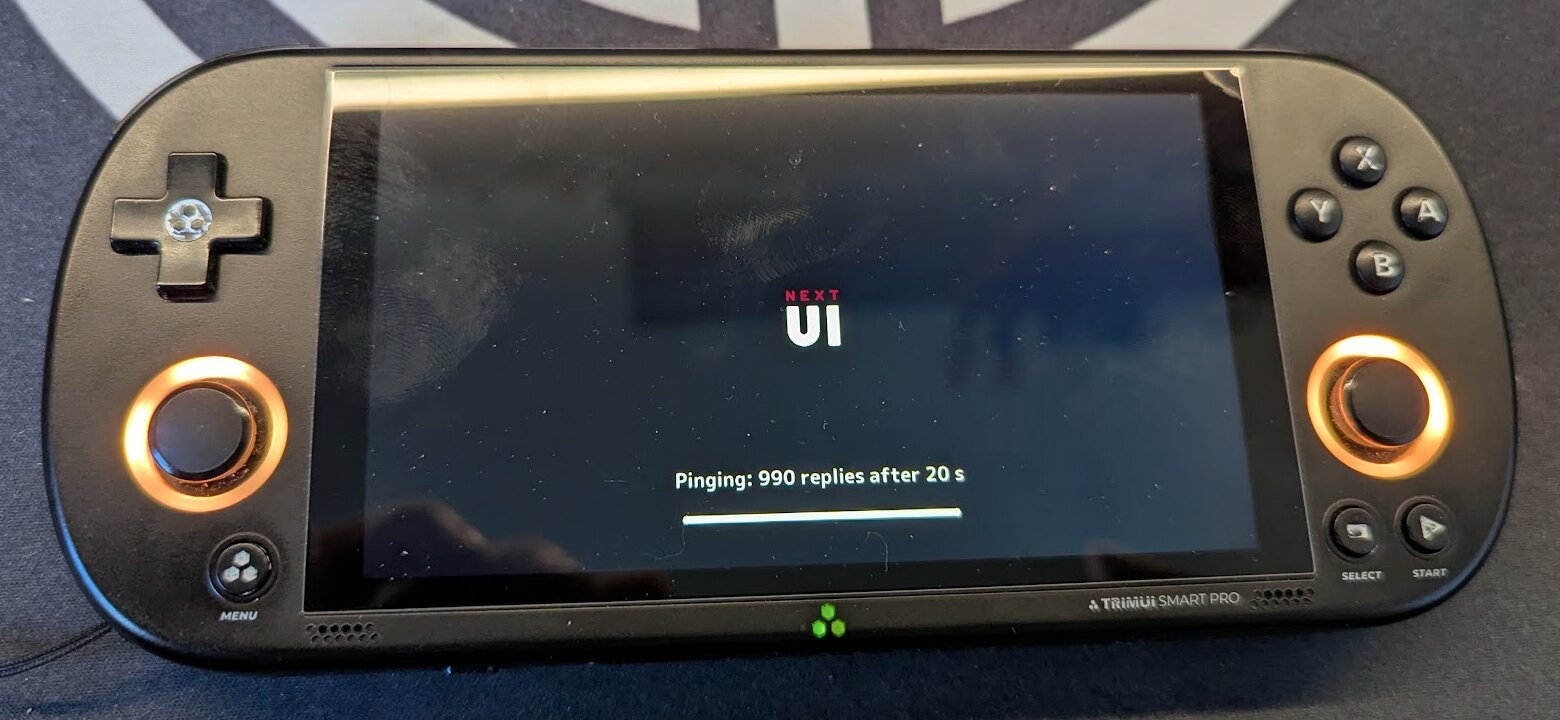
The result was right, but show2.elf outlived the pak and went on painting over NextUI’s menu: open the menu, and the test screen jumped straight back on top. The pak had stopped it with a plain kill. NextUI’s own launcher uses killall -9 show2.elf, and so does the pak now. The real app’s launch.sh takes the same lesson further. It starts the app in a process group of its own and, on exit or when the pak is stopped, sends the whole group TERM, follows it with KILL after two seconds, and puts WiFi power saving back the way it found it.
Go and gabagool
Three paks already on my SD card turned out to be Go programs, which settled the language. In Go, the handheld can reuse the desktop calibrator’s protocol decoder, session logic and leg-view geometry, none of which depend on Gio. go version -m on their binaries showed Go 1.26.9, gabagool v2 as the UI library and veandco/go-sdl2 v0.4.40.
Pak Store and Grout build in the same image, quasimodo: 25 lines of Debian bullseye, gcc, the SDL2 development packages and Go. That makes it a native arm64 build inside an arm64 container, on an arm64 machine or under QEMU on x86, with no cross-compiler involved. Bullseye’s glibc 2.31 is older than the handheld’s 2.33, so the binaries run there and use the device’s own SDL2 2.26.5. Spooder pins every dependency, and quasimodo builds on :latest, so Spooder has its own Containerfile of the same shape. It pins debian:bullseye-slim by digest, takes the Debian packages from a dated snapshot and checks Go 1.27.1 against its SHA-256, and it builds under rootless Podman with QEMU. gabagool runs on desktop Linux too, so the app can be tested on a laptop against the virtual robot, the robot’s control code running on my computer.
gabagool’s widgets are modal screens: lists, keyboards, messages. There is no dashboard widget, but gabagool.GetWindow() hands out the SDL renderer, and the dashboard draws on it directly. Its power button needs a change. With IsNextUI set, gabagool watches /dev/input/event1 itself: a short press runs NextUI’s suspend script and a long press runs /sbin/poweroff, which freezes the handheld at once, even with the robot mid-stride. The bridge’s timeout would still put the robot to sleep, but the order I want is to send Sleep, see it confirmed, and only then suspend. The fix is small: a PowerButtonHook option that, when set, is called in place of the suspend script or the power-off, so the app can request Sleep first. For now the app builds against gabagool v2.26.6 with that patch applied, and I mean to offer it upstream.
The dashboard
The handheld now talks to the robot’s real controller board. Its dashboard shows what the robot reports, what the handheld requests and the state of the link, and the link panel counts telemetry, pose and diagnostics at 10 frames a second each. When I took the photo, the handheld had sent 179,791 commands without an error, about an hour’s worth at 50 a second, and the robot’s sequence numbers showed six of its frames lost on the way back.
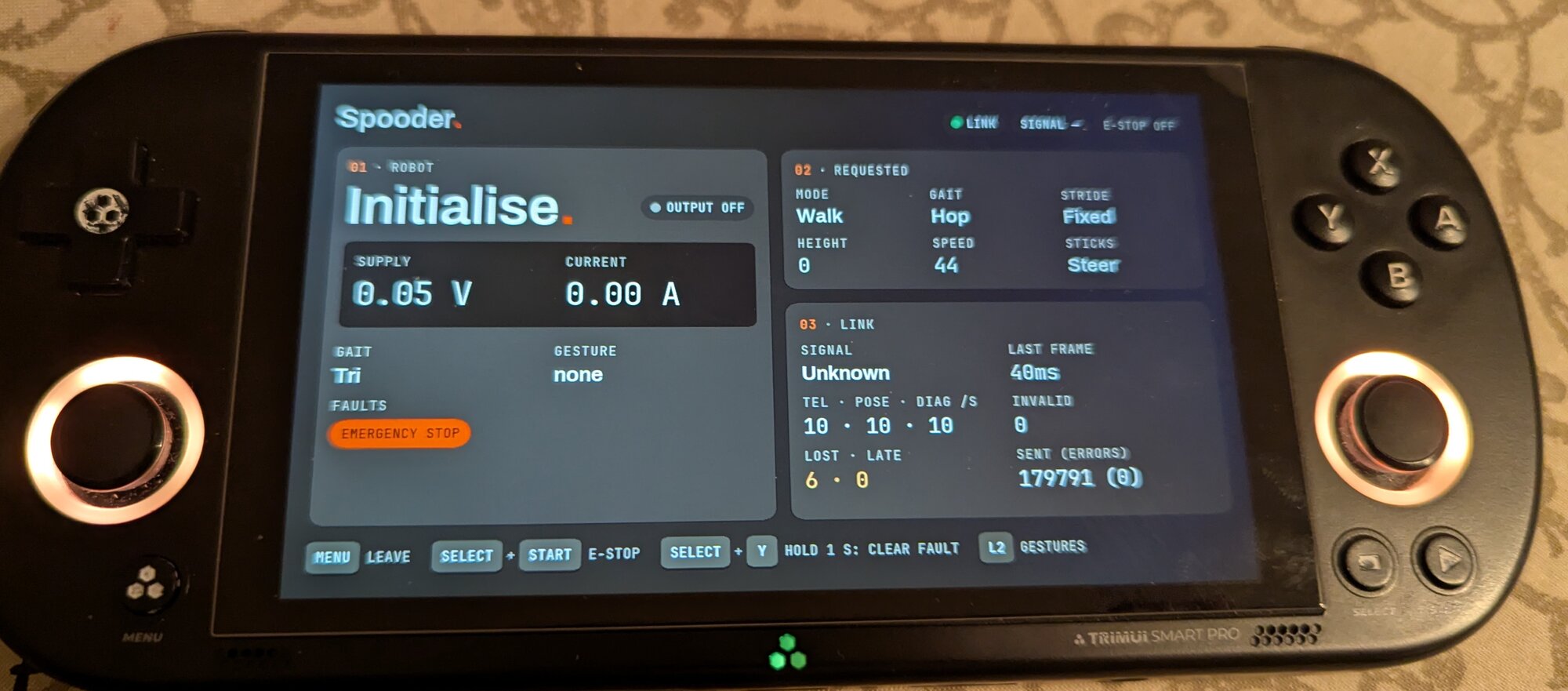
The robot stays put. I requested Walk and the Hop gait, but it remains in Initialise on the Tri gait with an emergency-stop fault latched, because clearing a fault never starts it moving by itself, and with the robot half-built there is nothing to move anyway.
The other states the screen handles come from the app’s screenshot test, which draws them from made-up readings so they can be checked without a robot. A latched fault lists its causes, and the button bar lights the hold that clears it. A link that goes quiet greys the robot’s panel and marks it stale. Leaving holds the app open with a banner until the robot confirms Sleep.
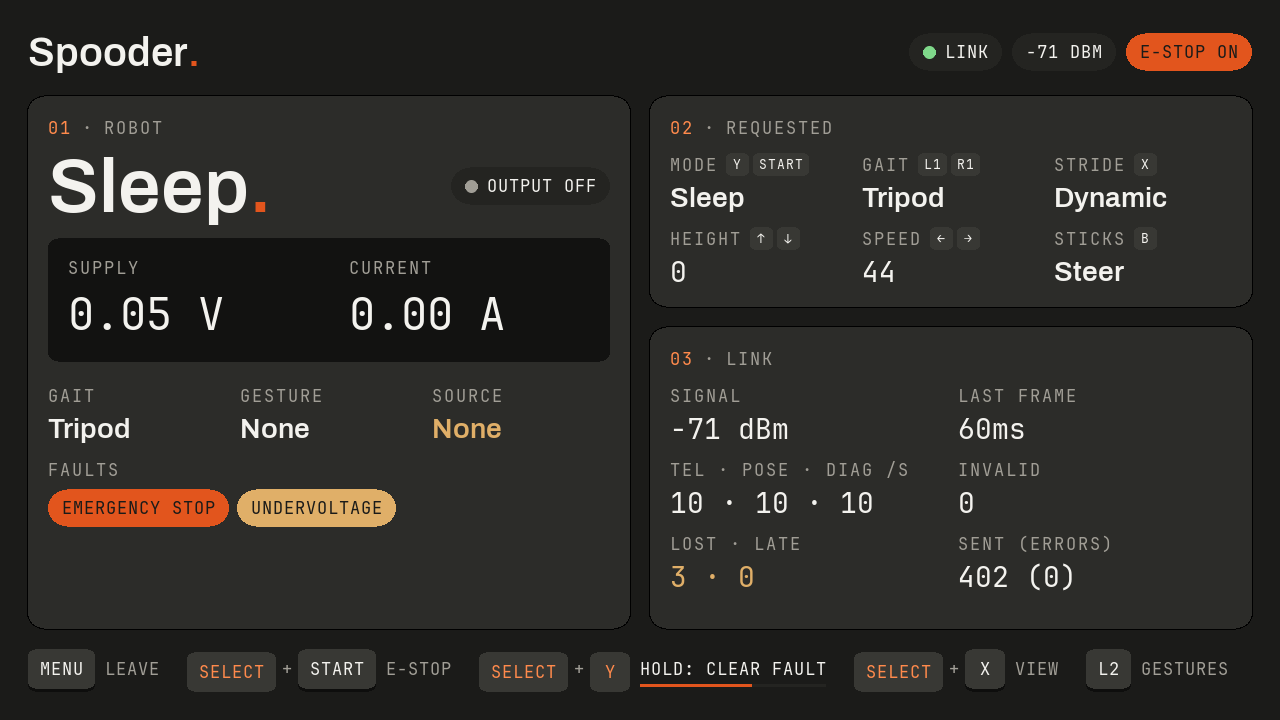
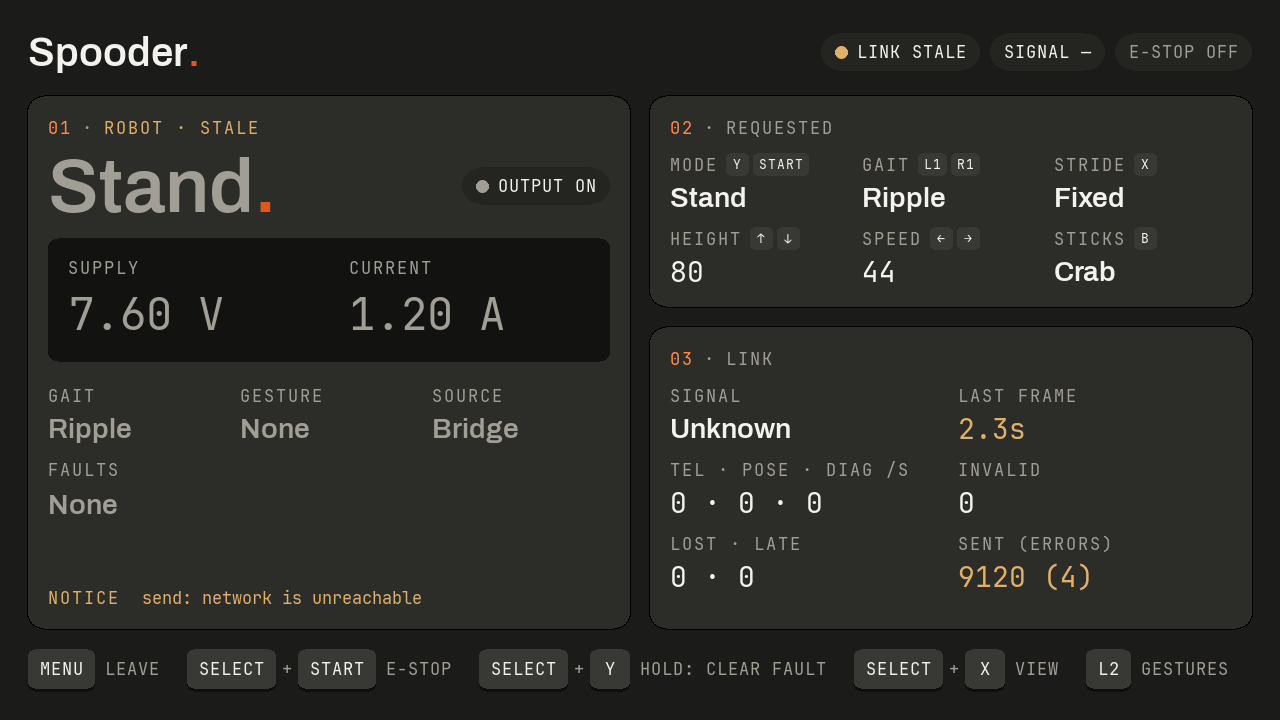
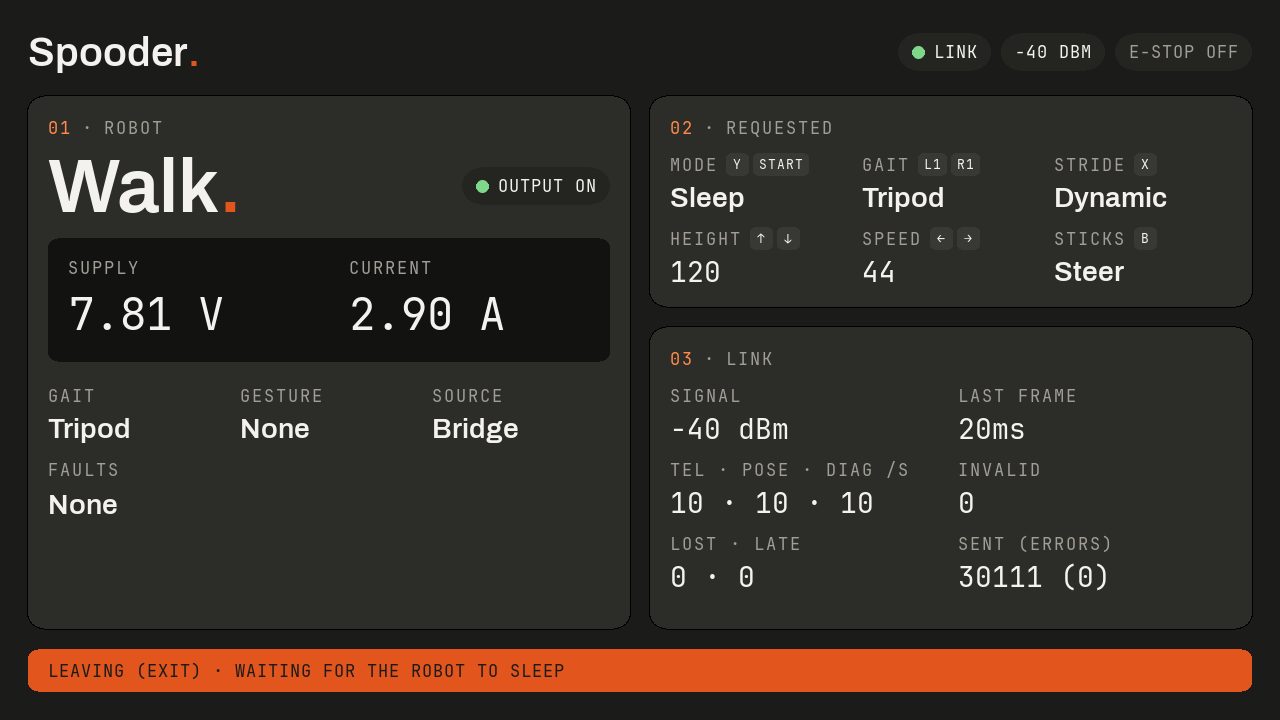
The robot’s controller board has since gained a bench simulation mode. A press of its USER button in the first three seconds after start-up enters it, as long as no servo supply is connected and a computer is on its USB port. The robot then runs its gait, kinematics and power protection as usual, but every servo call goes to a model, so no servo moves. Its telemetry carries a flag for it, and the handheld leads its header with a SIM chip.
Select and X swap the panels for a driving view, drawn from the pose frames as the desktop calibrator draws its views. A chase camera fixed behind the robot looks forward and 45° down over a ground grid, and joints near or at their servo limits are ringed. With the board in simulation, the legs on the screen move as the robot’s own firmware moves them.
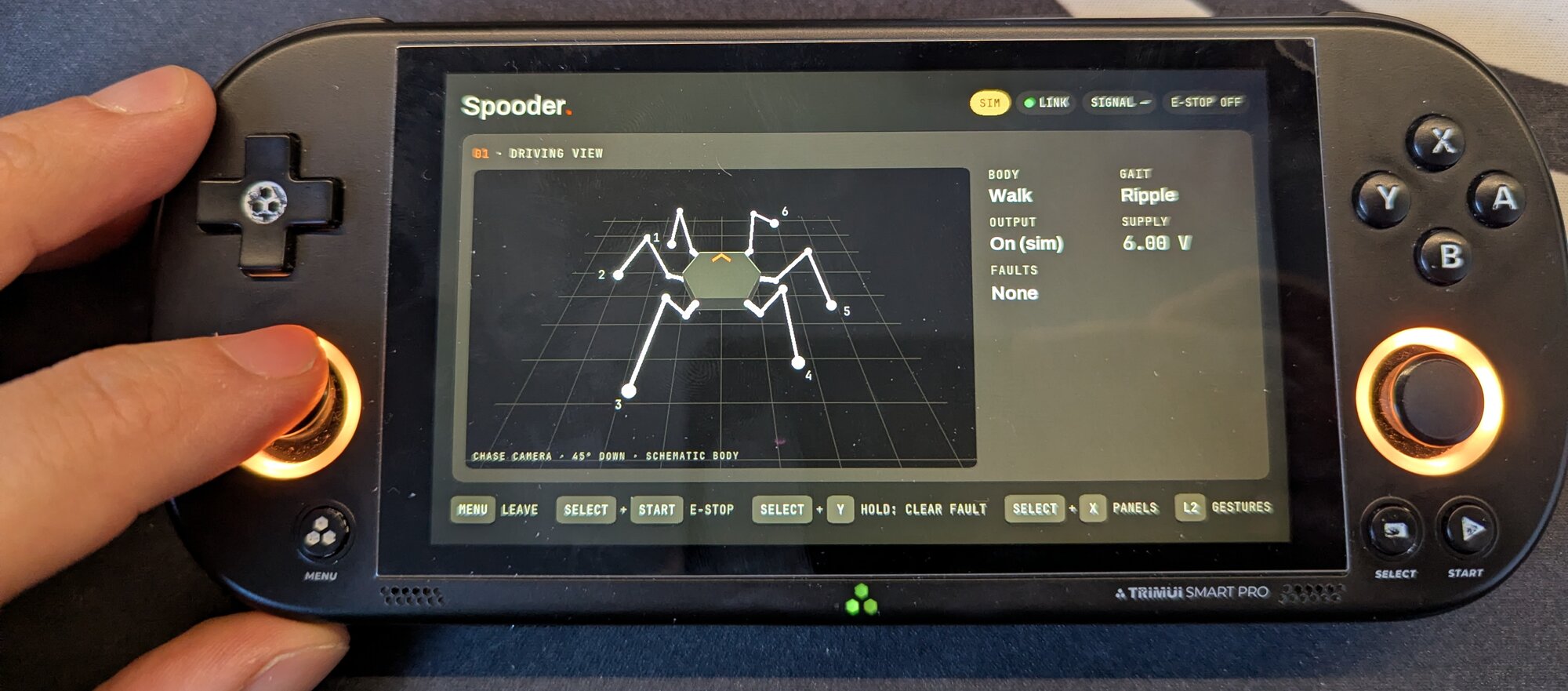
Holding L2 past half travel opens a gesture overlay over either page. Its five tiles sit where the TrimUI’s buttons do: A, B, X and Y as a diamond, with R2 beside it. Say hi and wiggle loop an animation drawn from the joint angles in the robot’s own script. Dance, attack and ball have no script yet, so their tiles show a standing robot marked NOT YET. A request lights its tile for a moment.
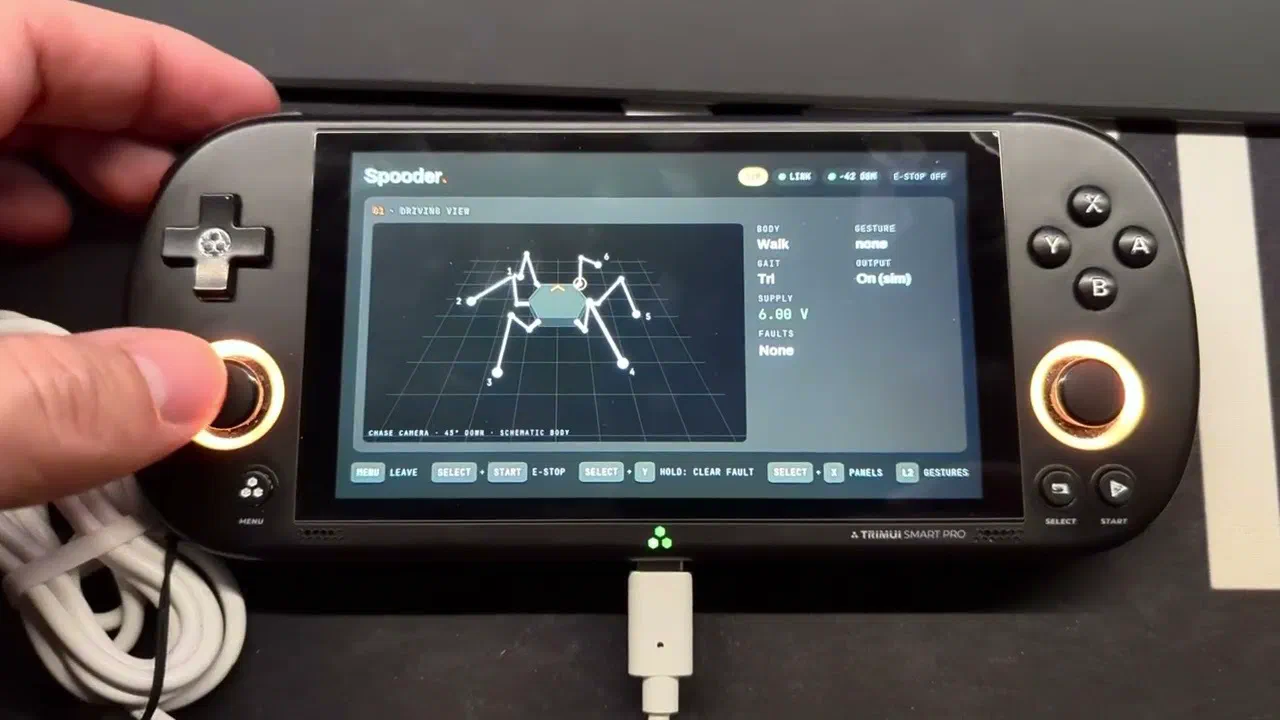
Until the screws arrive, those legs walk only in the model, and the WiFi test at range and while walking waits for them too.
CITE THIS POST
Referencing this in a paper or thesis? Here’s a BibTeX entry.
1@misc{galicz2026driving,2 author = {Galicz, Mikl{\'o}s},3 title = {{Driving Spooder from a TrimUI Smart Pro}},4 year = {2026},5 month = nov,6 howpublished = {\url{https://blackfyre.ninja/blog/driving-spooder-from-a-trimui-smart-pro/}},7 url = {https://blackfyre.ninja/blog/driving-spooder-from-a-trimui-smart-pro/},8 urldate = {2026-11-12},9 note = {Blog post, blackfyre.ninja}10}