CONTENTS05 +
The career day robot had no support, so I read its flash, had new firmware written from it and drove it from a TrimUI over two Wi-Fi bugs.
Spooder still needs screws. While it waits, the robot that actually walked into my daughter’s school on 8 October sits on the same desk: the palm-sized quadruped from Upping the Ante for Next Year’s Career Day, with eight SG90 servos and an ESP8266 on four printed legs. Its stock firmware serves a page of buttons on a Wi-Fi network called Spider Robot, password 12345678. Press Forward and it walks one cycle; while a motion plays, it ignores every other button. On 7 November I went looking for documentation and found only the original’s: it’s a Chinese clone of the LAFVIN Quadruped Spider Robot, and nobody supports the clone. So it got what Spooder got: firmware written from a specification, a drive link and a pak for the TrimUI Smart Pro. The only description of the hardware I had to write it from was the 4 MB already in its flash.
Reading the flash
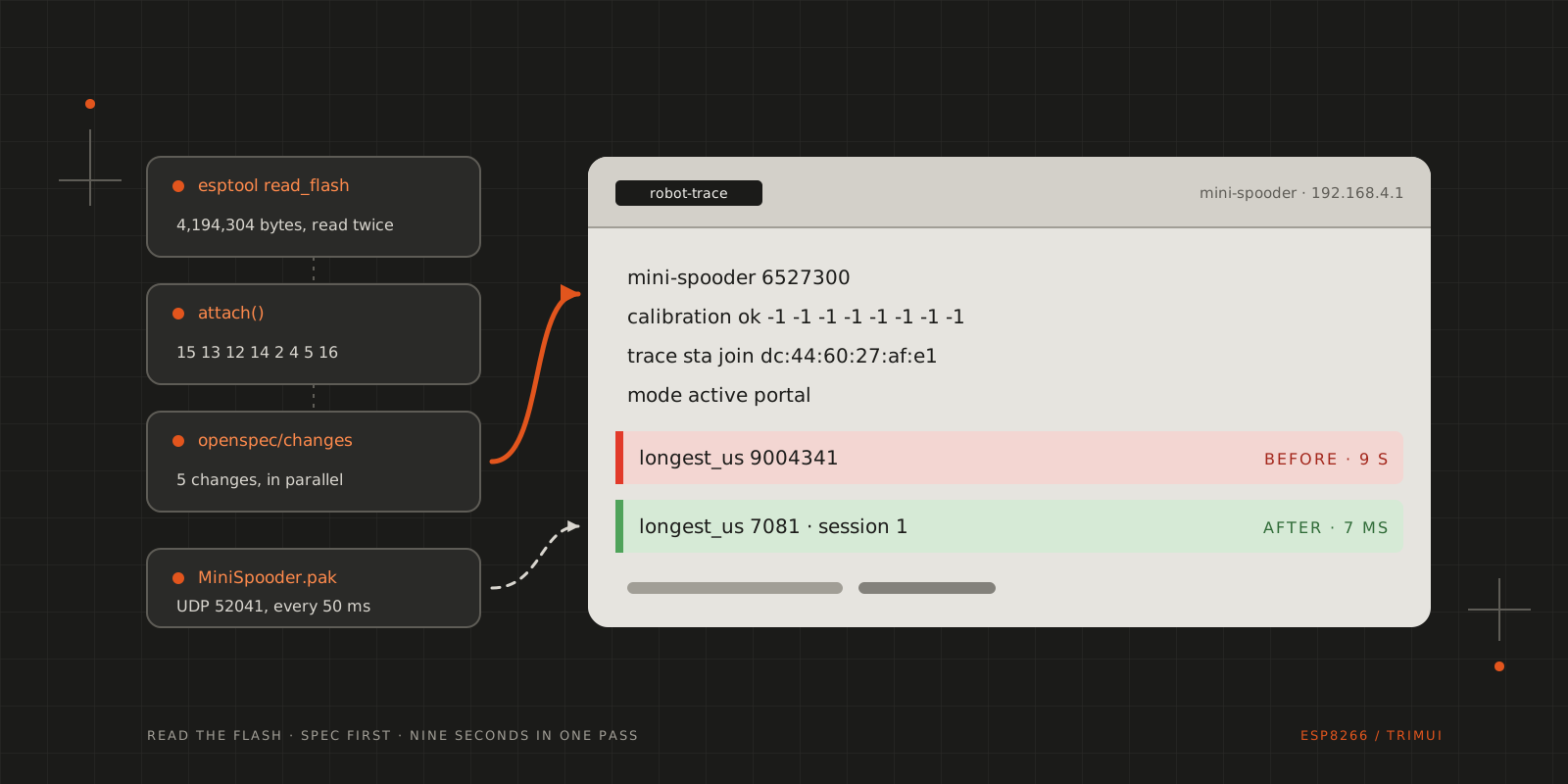
Before I read any of it, I copied it. esptool, Espressif’s flashing tool, read all 4,194,304 bytes over USB, and I read them a second time to compare: the two images were identical. That image is the only way back to the stock firmware.
Reading it took two passes. The first went through the readable strings and got several things wrong. The stock web page labels the servos with the ESP8266’s pins GPIO 14, 12, 13, 15, 16, 5, 4 and 2, but the attach calls in the disassembly use 15, 13, 12, 14, 2, 4, 5 and 16 at start-up. After any save on the calibration page, the firmware re-attaches them in a third order, which is a bug in the stock firmware. LAFVIN’s download has source code for the original robot, but in a different revision: of its motion tables, only Lie matches the image. The motions I kept come from the flash itself, 123 keyframes at 0x3FC9C-0x40DE7. Each keyframe is nine 32-bit integers: eight servo angles and a duration.
That set the rule for the rewrite, which I gave the agents as “the current firmware is our holy scripture”: the stock firmware defines the hardware. Anything it doesn’t use doesn’t exist. The stock firmware never reads the battery, so the new firmware has no battery sensing either.
Writing it again
The plan came first, the way it did for Spooder in How I Work with AI Agents, and Spooder’s firmware served as the reference. The firmware became five OpenSpec changes: the foundation, motion playback, the drive link, the web portal and the handheld pak. Agents wrote them in parallel, each in its own git worktree. Codex reviewed each change several times, and then the five were checked against each other. The firmware and the pak are in mini-spooder on GitHub, with field notes that keep the evidence for everything that follows.
The robot’s first boot on the new firmware:
1mini-spooder 56fefe5-dirty2reset external3calibration ok -1 -1 -1 -1 -1 -1 -1 -1It stayed limp, as designed: the new firmware moves the servos only when something asks it to. The eight −1s are the stock calibration: the stock calibration page stores one trim per servo in the flash, and on this robot that sector was erased, so every trim reads as −1. Limp also proved less than it seemed. On USB alone the servos never move, whatever the firmware does, so the check had to be repeated on the battery.
The handheld that wouldn’t stay
The pak had to join the robot’s network before it could drive it, and the TrimUI wouldn’t stay on that network. It joined, and six to nine seconds later it was back on my home Wi-Fi. A phone stayed connected without trouble, and the console showed no reset, so the robot wasn’t crashing. A trace build of the firmware logged each visit:
113:53:17 trace sta join dc:44:60:27:af:e1 aid 2 t 393607213:53:25 trace sta leave dc:44:60:27:af:e1 aid 2 t 401751| Suspect | Test | Result |
|---|---|---|
The space in Spider Robot | Renamed the network mini-spooder, which I wanted anyway | Still dropped |
| The TKIP cipher, which the ESP8266’s SDK can’t switch off | A probe pak that joins and reports | Handshake completed; connection held |
| The robot’s DHCP server | The probe asked for an address itself | 192.168.4.101 in about 2 s |
| Spooder’s bridge on the same desk, broadcasting a network the TrimUI had saved | Switched the bridge off | The TrimUI stopped moving to it, but still dropped |
The cause was in NextUI’s Wi-Fi start-up script, wifi_init.sh. It starts one background DHCP client, the program that asks a network for an address, when Wi-Fi comes up, and it never restarts that client:
# Start DHCP client to obtain IP addressif ! pidof udhcpc > /dev/null 2>&1; then udhcpc -i $WIFI_INTERFACE -b 2>/dev/nullfiChoosing another network in Settings changes only which network the TrimUI is associated with. NextUI’s log showed it connected to mini-spooder on its home address:
1[INFO] Connected AP: mini-spooder2[INFO] IP address: 192.168.0.84With no usable address, NextUI moved back to a saved network within seconds. The probe had worked only because it ran udhcpc itself. MiniSpooder.pak now joins the robot on its own terms: it selects mini-spooder, which disables the other saved networks for the session, asks for a fresh address, and switches every network back on when it exits.
Nine seconds in one pass
The firmware runs as a single loop, and each pass takes these steps in this order:
- Read the drive link, and apply the failsafe if the handheld has gone quiet.
- Serve the portal.
- Advance the current motion by at most one step.
- Send telemetry to the handheld.
- Write the servos.
The drive link comes first, so a stop or a failsafe takes effect before anything moves in the same pass. At idle the loop makes about 33,000 passes a second, and the longest takes under a millisecond. The firmware counts every pass over 20 ms, and the trace build reports the longest pass every five seconds. Nothing runs in parallel, so a pass that waits holds everything up, the failsafe included.
While the TrimUI kept dropping, one heartbeat reported a longest pass of nine seconds:
113:54:51 trace beat t 488469 sta 2 heap 40208 passes/5s 48626 longest_us 9004341 over 2 mode active session 0That pass came from a test of the portal. A phone on the robot’s network, driven over adb, fetched a page with nc, which closes the connection before the page is done. A weak or switching phone connection does the same. The portal sent its pages with ESP8266WebServer’s send_P, and each chunk of a page waited up to 500 ms for room in the send buffer. A client that went away in the middle of a page left all of its roughly 18 chunks to wait out that timeout, one after another. For those nine seconds the robot ran no motion, read no drive link and had no failsafe. Even an ordinary page load took 63-72 ms per pass. The portal now sends each page in pieces: in each pass it writes only what the send buffer accepts, carries on in the next pass, and drops a client that makes no progress for two seconds. While I browsed the portal and drove the robot, the longest pass was 7-9 ms.
It walks
Before it walked, it did nothing at all. I pressed Standby on the portal, the console logged mode active portal, and no servo moved. The firmware was fine. The 400 mAh battery was flat, and the robot can’t tell: nothing connects the battery to A0, the ESP8266’s only analogue input.
The pak and the robot talk over UDP. The pak sends a 9-byte command every 50 ms, and the robot answers with 33 bytes of telemetry every 100 ms. If no command arrives for 300 ms, the session ends: the motion stops and every servo goes limp. The portal’s requests pass through the same output gate, which refuses them while the pak has control.
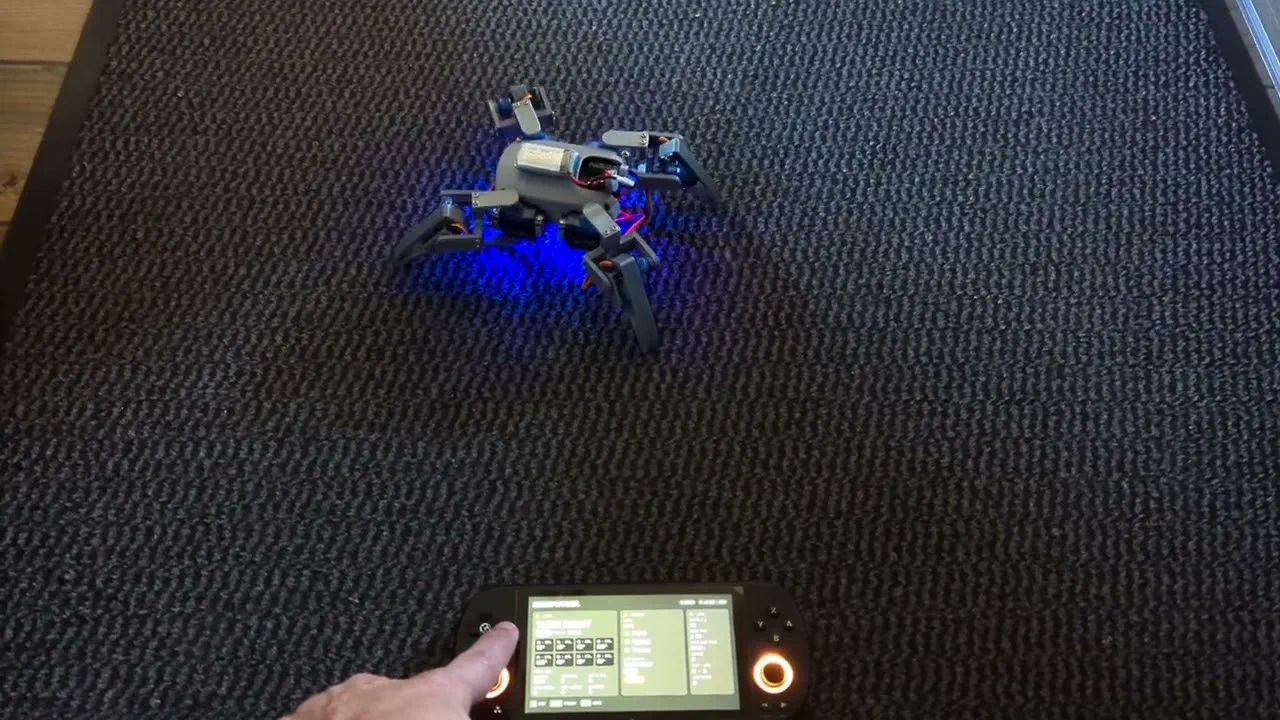
1flowchart LR2 pak["MiniSpooder.pak<br/>(TrimUI Smart Pro)"] -- "UDP 52041, 50 ms" --> link3 link -- "telemetry, 100 ms" --> pak4 phone["Phone browser"] -- "HTTP 80" --> portal5 subgraph robot["ESP8266: mini-spooder, 192.168.4.1"]6 link["drive link"] --> player["motion player"]7 portal["web portal"] --> player8 player --> gate["output gate"]9 link -- "link loss" --> gate10 gate --> driver["8 servos"]11 endWith a charged battery, the pak joined the robot’s network by itself. The robot walked for as long as I held a direction, and it stopped when I pressed B.
CITE THIS POST
Referencing this in a paper or thesis? Here’s a BibTeX entry.
1@misc{galicz2026spooderifying,2 author = {Galicz, Mikl{\'o}s},3 title = {{Spooderifying the Career Day Robot}},4 year = {2026},5 month = nov,6 howpublished = {\url{https://blackfyre.ninja/blog/spooderifying-the-career-day-robot/}},7 url = {https://blackfyre.ninja/blog/spooderifying-the-career-day-robot/},8 urldate = {2026-11-19},9 note = {Blog post, blackfyre.ninja}10}