CONTENTS05 +
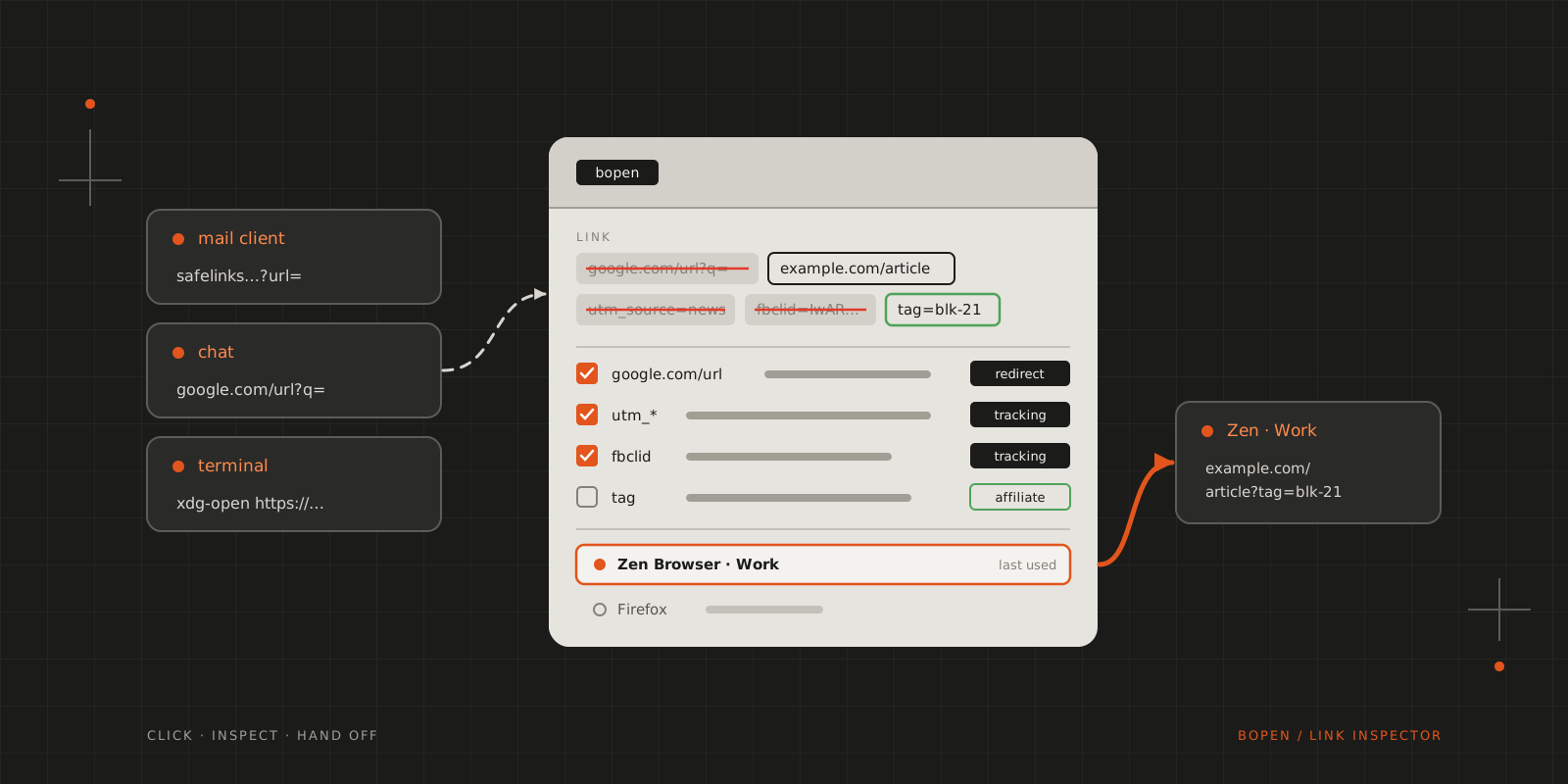
bopen sits between a clicked link and the browser: it explains and removes tracking, then opens the link in the browser you pick.
Copy a link out of a Google result, a Facebook post or a Safe Links-protected Outlook mail and paste it somewhere you can read it. The address you meant to visit is in there, usually percent-encoded inside a q= or url= parameter, wrapped in a redirect that logs the click before passing you on, and followed by a tail of utm_source, utm_medium and fbclid that tells the destination where you came from. None of this is visible when you click, because the operating system hands the link straight to the browser. bopen sits in that hand-off.
I know this isn’t a new idea. Junction already sits at this hand-off on Linux: it registers as the default browser and asks which application should open each link, and I used it for a while. bopen does the same job, with the things I wanted from that step built in. ClearURLs and Brave’s built-in URL cleaner cover a different case, the links I copy and send to other people, and they stay useful for that.
The inspector
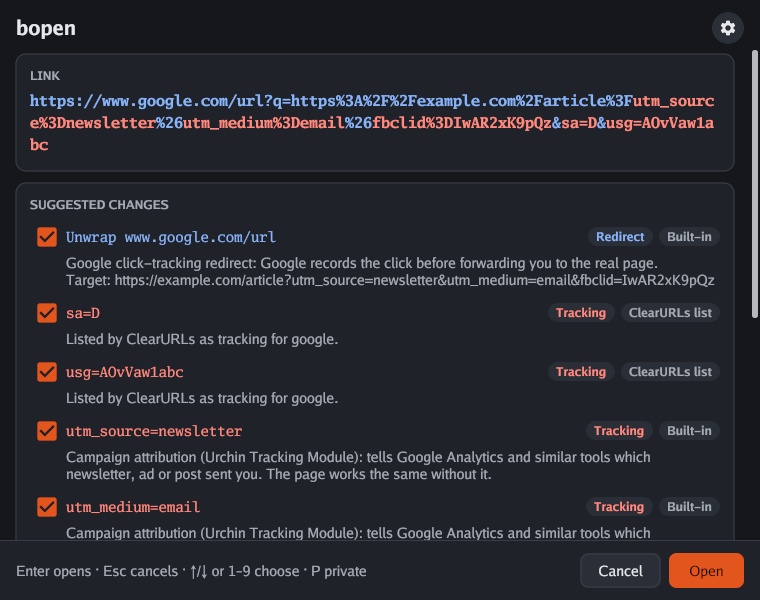
Click a link and a small window opens instead of a browser. It shows the link with everything bopen would remove highlighted, and lists each suggestion underneath with the reason for it and where the rule comes from: bopen’s own rules, or the ClearURLs list if you’ve turned it on. Untick a suggestion and the cleaned link updates. Below the suggestions are the installed browsers, with the one you used last already selected. Enter opens the link and Esc drops it.
The rules lean towards leaving things alone. bopen has nineteen built-in rules, few enough that each carries a sentence explaining itself, and it suggests nothing it can’t explain. Affiliate tags are the exception to removal: a parameter such as Amazon’s tag credits whoever shared the link with a commission and doesn’t change the price, so bopen shows it with that reason and leaves it in unless you untick it.
When nothing is removed, the browser gets exactly the link that was clicked. An early version passed every link through Go’s URL parser on the way out, which re-encoded /café as /caf%C3%A9, dropped an empty #, and refused links with a malformed escape like %zz that every browser opens without complaint. Now the link is handed over as received, with only the accepted suggestions taken out.
Browsers, profiles and your own rules
The browser list is where bopen does Junction’s job, and where most of the settings live. Browsers with several profiles get one entry per profile, read from Firefox, Zen and LibreWolf’s profiles.ini and from the Local State file of Chrome, Chromium, Brave, Edge and Vivaldi, so Zen Browser · Work is a choice of its own. P opens the link in a private window instead. Site rules pin a host pattern such as *.atlassian.net to one of these entries, and they look at where the link ends up, so a Jira link that arrives inside an Outlook Safe Links redirect still goes to the work profile. A rule can also skip the inspector entirely and open matching links straight away, with tracking parameters still removed.
The rules about what to remove can be extended the same way. Right-click a parameter in the link, choose Always flag, and decide whether it’s tracking or affiliate, whether it applies to that host or everywhere, and why. The reason is required, because it’s what the inspector shows next to every suggestion the rule makes, and a rule without one is ignored. Your rules take precedence over the built-in ones, and any built-in rule can be switched off.
Network use, only when asked
Out of the box, bopen makes no network requests. Two features need one, and both stay off until you turn them on in the settings.
Shortened links from bit.ly, t.co, lnkd.in and similar services hide where they lead, so there is nothing to inspect until they are resolved. With short-link expansion on, the inspector offers an Expand button for them. Pressing it sends a HEAD request without cookies to the shortener, follows redirects only between known shorteners, and stops before contacting the destination, which then replaces the link and is cleaned like any other. Nothing is sent until you press the button.
The other is the ClearURLs list, the community rule set behind the extension, covering tracking parameters and redirect wrappers on about 200 sites. Its suggestions are labelled as such, as in the screenshot above, and carry a generic reason naming the site; bopen’s own rules and yours win where they overlap. The list is downloaded over HTTPS, checked against its published SHA-256 hash, and refreshed at most once a day in the background while the inspector is open, so a link never waits for it. It isn’t bundled with bopen because it’s licensed under the LGPL-3.0, and bopen is MIT.
Cleaning links you send
ClearURLs and Brave cover links sent from the browser. For everything else, bopen clean applies the same rules to links given as arguments or piped in one per line, with the default suggestions accepted and no network access, and --explain lists what it removed and why on standard error:
$bopen clean 'https://example.com/a?utm_source=news&id=7'https://example.com/a?id=7$wl-paste | bopen clean | wl-copyThe second line cleans whatever is on the clipboard, which covers links copied from a terminal or a chat window before they’re passed on. In the inspector, C does the same for the link in front of you without opening it.
Installing
bopen runs on Linux and Windows, on x86-64 and arm64, and follows the desktop’s light or dark mode, accent colour and high-contrast setting. On Linux, the install script puts it in ~/.local/bin without root, after checking the download against the release’s checksums, which are signed with Sigstore by the release workflow:
curl -fsSL https://raw.githubusercontent.com/blackfyre/bopen/main/install.sh | shbopen register.deb and .rpm packages are attached to every release as well. On Windows, download the zip from the latest release and run bopen.exe register, which opens Settings for you to pick bopen as the default, since Windows doesn’t let programs do that themselves. The executable isn’t code-signed yet, so SmartScreen may warn the first time. bopen unregister restores the browser you had before. The source and the full documentation are on GitHub.
CITE THIS POST
Referencing this in a paper or thesis? Here’s a BibTeX entry.
1@misc{galicz2026inspecting,2 author = {Galicz, Mikl{\'o}s},3 title = {{Inspecting Links Before the Browser Gets Them}},4 year = {2026},5 month = oct,6 howpublished = {\url{https://blackfyre.ninja/blog/inspecting-links-before-the-browser-gets-them/}},7 url = {https://blackfyre.ninja/blog/inspecting-links-before-the-browser-gets-them/},8 urldate = {2026-10-22},9 note = {Blog post, blackfyre.ninja}10}