CONTENTS11 +
A guide to a containerised media automation setup using the Arr stack, Podman Quadlets and systemd on Fedora Server.
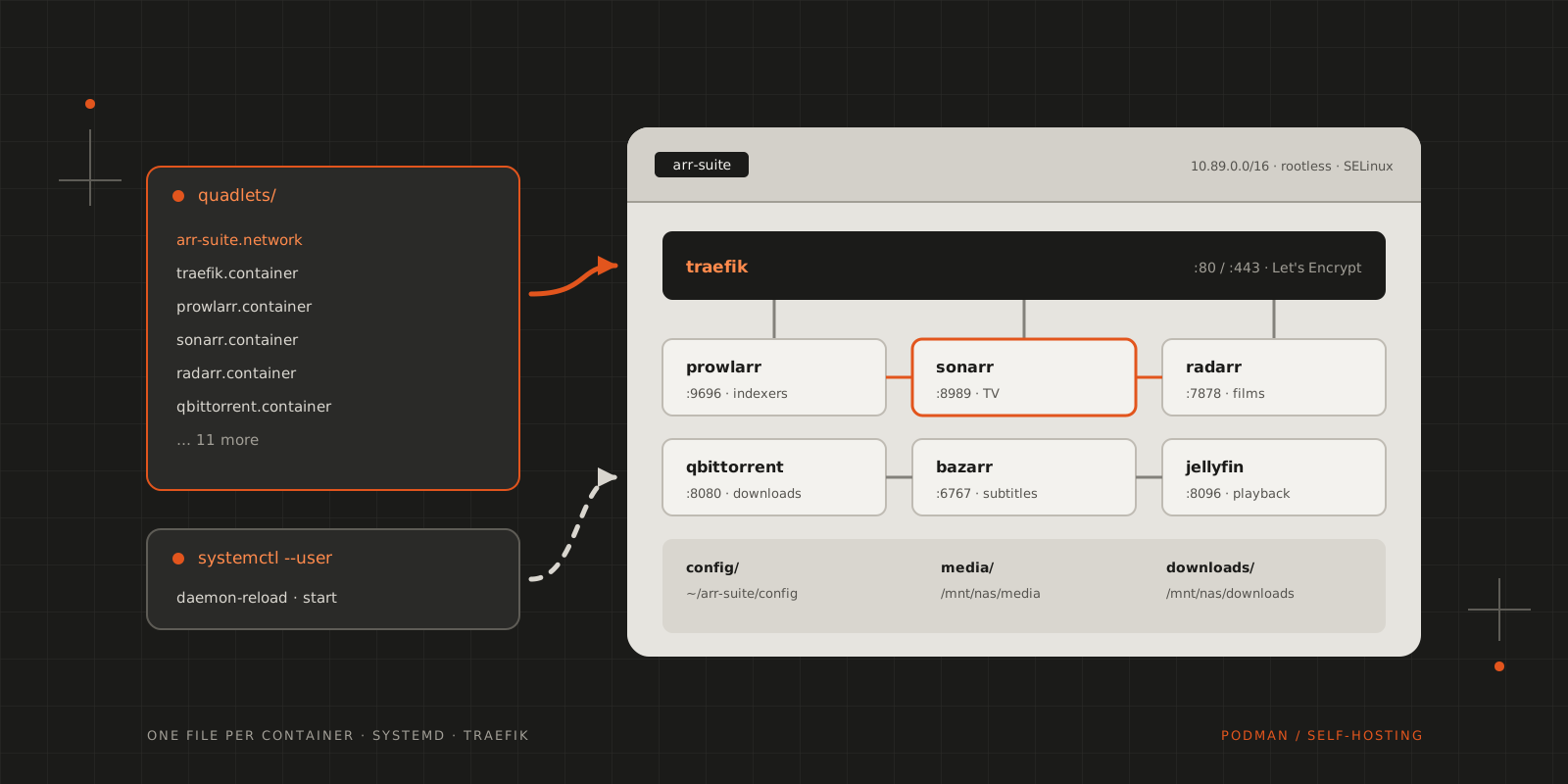
With streaming services and digital media everywhere, managing a personal media library has become more complicated. This article documents a self-hosted media automation suite that discovers, downloads, organises and serves your media collection, with security and reliability in mind throughout.
It is built on the “Arr” ecosystem, a collection of applications designed to work together, and deployed with Podman Quadlets, which run containers as native systemd services. The result is reliable while staying lightweight and maintainable enough for a home lab.
1flowchart LR2 U[User] --> F[Firewall] --> T[Traefik]3 T --> S[Sonarr]4 T --> R[Radarr]5 T --> P[Prowlarr]Architecture overview
The Arr ecosystem
The setup implements the complete Arr workflow. Prowlarr manages the indexers, Sonarr, Radarr, Lidarr and Readarr manage the media, qBittorrent downloads it, Bazarr adds subtitles and Jellyfin serves the result.
Core components:
| Service | Port | Role |
|---|---|---|
| Prowlarr | 9696 | The central indexer manager with 200+ preconfigured torrent trackers |
| Sonarr | 8989 | TV show automation and library management |
| Radarr | 7878 | Film discovery, download and organisation |
| Lidarr | 8686 | Music library automation |
| Readarr | 8787 | Ebook and audiobook management |
| qBittorrent | 8080 | Primary BitTorrent client for media downloads |
| Bazarr | 6767 | Subtitle automation for films and TV shows |
Media servers and services:
| Service | Port | Role |
|---|---|---|
| Jellyfin | 8096 | Open-source media streaming server |
| Audiobookshelf | 13378 | Specialised audiobook and podcast server |
| ConvertX | 3000 | Self-hosted file format converter supporting 1000+ formats |
| ThinkDashboard | 8082 | Lightweight bookmark dashboard with keyboard shortcuts |
Infrastructure services:
| Service | Port | Role |
|---|---|---|
| Traefik | 80/443 | Reverse proxy with automatic SSL via Let’s Encrypt |
| n8n | 5678 | Workflow automation platform for custom integrations |
| PostgreSQL | 5432 | Database backend for n8n and other services |
| Jaeger | 16686 | Distributed tracing for performance monitoring |
| RustDesk | 21115–21119 | Self-hosted remote desktop solution |
Why Podman Quadlets?
Container orchestration often involves complex YAML files and an external orchestrator. Podman Quadlets integrate directly with systemd instead, so the containers behave like any other system service: systemd directives set the startup order, and systemd’s resource controls and monitoring apply to them. The containers run rootless with SELinux integration, and there is no orchestrator to run alongside them.
Deployment architecture
The entire suite runs within a single Podman network (arr-suite) using the subnet 10.89.0.0/16. Services communicate internally and reach each other by container name, so no unnecessary ports are exposed. External access goes through the Traefik reverse proxy, and traffic analysis and logging are centralised.
Storage comes in three tiers. Persistent service configuration lives in /home/user/arr-suite/config/, the organised media library in /mnt/nas/media/, and downloads are staged temporarily in /mnt/nas/downloads/ while they are processed. Keeping them apart protects the data that matters and lets downloads be processed without touching the library.
1flowchart LR2 Q[qBittorrent] --> DL[("/mnt/nas/downloads/<br/>staging")]3 DL --> M["Arr media managers<br/>organise"]4 M --> LIB[("/mnt/nas/media/<br/>library")]5 LIB --> J[Jellyfin]6 CFG[("/home/user/<br/>arr-suite/config/<br/>configuration")]Implementation details
Each service is defined in a .container file that follows systemd unit file syntax:
1[Unit]2Description=sonarr container3Wants=network-online.target4After=network-online.target arr-suite-network.service qbittorrent.service prowlarr.service5Requires=arr-suite-network.service qbittorrent.service prowlarr.service67[Container]8Image=lscr.io/linuxserver/sonarr:latest9ContainerName=sonarr10PublishPort=8989:898911Network=arr-suite.network12Volume=/home/user/arr-suite/config/sonarr:/config:z13Volume=/mnt/nas/media:/media:z14Volume=/mnt/nas/downloads:/downloads:z15Environment=PUID=100016Environment=PGID=100017Environment=TZ=Europe/Budapest18Label=io.containers.autoupdate=registry19Label=traefik.enable=true20Label=traefik.http.routers.sonarr.rule=Host(`sonarr.my-address.noip.me`)21Label=traefik.http.routers.sonarr.tls=true22Label=traefik.http.routers.sonarr.tls.certresolver=letsencrypt23Label=traefik.http.services.sonarr.loadbalancer.server.port=898924Label=traefik.http.routers.sonarr.middlewares=default-headers@file2526[Service]27Restart=always2829[Install]30WantedBy=default.targetThe management script works out the startup order from the Requires and After directives and starts the services in that sequence.
Traefik routes traffic based on container labels. Each service gets its own subdomain under *.my-address.noip.me with a Let’s Encrypt certificate, middleware adds the security headers, and services register themselves when their containers start.
A few more pieces are automated. A generator builds Traefik’s dynamic routing config from the container labels, a DNS updater keeps the external records pointing at the dynamic IP address, a health monitor checks service status and raises alerts, and container images update themselves through registry labels.
For extra protection, Traefik’s fail2ban plugin can block IPs after repeated authentication failures, which guards the administrative interfaces against brute-force attacks. The ban duration and retry thresholds are configurable, the plugin works together with the system’s own fail2ban, and it detects and responds to threats in real time.
Other services
ConvertX converts files between more than 1000 formats, including documents, images and videos. It replaces online conversion services and fits into the media workflow when formats need standardising.
n8n handles custom automation. It integrates with the APIs of all the Arr services, runs custom notification workflows and content processing rules, and keeps its workflows in PostgreSQL. Custom scripts cover maintenance and configuration: generating the dynamic Traefik configuration, managing DNS records for dynamic IPs, monitoring service health with alerts, and automating backup and restore.
Jaeger traces requests across services, which helps to find performance bottlenecks, monitor and optimise API calls, and analyse performance trends over time.
Management and operations
A management script, setup-quadlets.sh, is the central control point for the whole arr-suite. It finds the services by scanning the quadlets/ directory for .container and .network files, so nothing has to be registered by hand. It parses the Requires and After directives into a dependency graph and starts each service only after its dependencies are ready. These are its commands:
# Initial setup and configuration$./setup-quadlets.sh setup# Creates systemd symlinks, reloads daemon, opens firewall ports# Service lifecycle management$./setup-quadlets.sh start|stop|restart# Handles services in correct dependency order# Health and status monitoring$./setup-quadlets.sh status# Shows systemd status, port exposure, and service descriptions# Network diagnostics$./setup-quadlets.sh ports # List all exposed ports$./setup-quadlets.sh urls # Generate service URLs for quick access# Individual service operations$./setup-quadlets.sh logs # View service logs$./setup-quadlets.sh shell # Access container shell$./setup-quadlets.sh inspect # Container inspectionThe script reads the required ports from the Quadlet PublishPort directives and manages the firewalld rules for them, checking that only the necessary ports are exposed. It reports status in colour: red for errors, green for success, yellow for warnings. It can operate on all services at once while still respecting the dependency order, which prevents race conditions during startup and shutdown. Before any operation, it checks that systemd can parse the Quadlet files, so configuration errors surface early.
All service definitions live in the Quadlet files, and the script discovers them instead of keeping a separate list of services. Running setup more than once gives the same result, so it is safe to re-run for updates or troubleshooting. Operations stop at the first error with a clear diagnostic message, which prevents cascading failures, and every operation respects service dependencies, whether it starts services, stops them or performs maintenance.
The script also detects circular dependencies and handles them gracefully, starts network services before container services, cleans up properly during shutdown to avoid resource leaks, and reloads the systemd daemon when Quadlet files change.
Each service keeps its configuration in a dedicated directory:
1config/2├── sonarr/ # TV show management configuration3├── radarr/ # Film management configuration4├── prowlarr/ # Indexer definitions and settings5├── qbittorrent/ # Download client settings6├── traefik/ # Reverse proxy configuration7└── jellyfin/ # Media server preferencesScalability and maintenance
The architecture is easy to extend. A new Arr application is one more Quadlet file, services can be distributed across multiple nodes, and Traefik supports multiple backend instances for load balancing.
Services update automatically through the container registry label:
1Label=io.containers.autoupdate=registryConfiguration data is kept separate from the container images, so the configuration directories can be backed up independently, images are pulled fresh during updates, and PostgreSQL is backed up automatically. Health is monitored through systemd, Traefik’s health checks and custom scripts for application-specific metrics.
Security considerations
All containers run without root privileges, which reduces the attack surface, limits system access and isolates user namespaces. SELinux adds fine-grained access control: the :z volume labels restrict file system access, network policies are enforced, and processes are isolated and monitored.
No service trusts any other by default. Communication goes through authenticated channels, container networks segment the traffic, and traffic is monitored and logged. TLS covers everything: Let’s Encrypt certificates are managed automatically, HTTPS is enforced for all services, and internal service communication is encrypted as well.
The reverse proxy enforces security policy in one place, with authentication middleware for administrative interfaces, rate limiting and DDoS protection, security header injection, and the optional fail2ban plugin for blocking IPs that show suspicious activity.
Performance optimisation
Each service has its own memory limit, swap usage is monitored and tuned, and garbage collection is tuned for media processing. Different types of data get separate volumes, the filesystems for media storage are chosen for the job, and temporary processing files are cleaned up automatically. Between services, the container network is tuned for performance, database connections are pooled, and API endpoints use caching.
Troubleshooting and diagnostics
Logs go to the systemd journal and to application-specific log files, with rotation and retention policies. Built-in tools visualise service dependencies, test network connectivity and profile performance.
Services that fail to start usually have a dependency problem, which the automatic dependency ordering, service health checks and configuration validation tools help with. For connectivity problems between services, there is network topology visualisation, port conflict detection and resolution, and DNS resolution debugging.
Future enhancements
Planned next are better monitoring (metrics collection and visualisation, alerting and notifications, performance trend analysis), data protection (automated configuration backups, checksumming and validation of the media library, disaster recovery procedures) and more automation (machine learning for content recommendations, more advanced content processing pipelines, integration with external media databases).
Resources and further reading
- Podman Quadlets documentation
- Arr application documentation
- Traefik reverse proxy guide
- systemd service management
I’ve created a template repository at codeberg.org/blackfyre/arr-suite for your scrutiny!
CITE THIS POST
Referencing this in a paper or thesis? Here’s a BibTeX entry.
1@misc{galicz2025complete,2 author = {Galicz, Mikl{\'o}s},3 title = {{Building a Complete Self-Hosted Media Automation Suite with Podman Quadlets}},4 year = {2025},5 month = oct,6 howpublished = {\url{https://blackfyre.ninja/blog/building-a-complete-self-hosted-media-automation-suite-with-podman-quadlets/}},7 url = {https://blackfyre.ninja/blog/building-a-complete-self-hosted-media-automation-suite-with-podman-quadlets/},8 urldate = {2026-10-28},9 note = {Blog post, blackfyre.ninja}10}